Type-Safe Environment Variable Validation with Zod
Use Zod to validate environment variables in JavaScript so configs fail fast and you avoid runtime surprises across environments.
Published on
3 min readFor many developers starting out, the journey into configuring application secrets and settings often begins with the simple .env file, lovingly managed by libraries like dotenv. The allure is immediate: a straightforward way to keep sensitive information out of the codebase and configure applications across different environments. Accessing these variables is as easy as reaching into the global process.env object.
const apiKey = process.env.API_KEY;However, this simplicity can quickly become a source of silent errors and deployment headaches as projects grow in complexity. The inherent untyped nature of process.env opens the door to typos, missing variables in crucial environments, and the tedious task of manual validation.
Consider a scenario where API_KEY is a critical requirement for your application to function. Without explicit checks, accessing it might yield undefined, leading to cryptic runtime errors that can be time-consuming to debug. The responsibility falls squarely on the developer to remember these checks and ensure they are consistently applied.
const apiKey = process.env.API_KEY;if (!apiKey) { throw new Error('API_KEY is not set in the environment.');}Furthermore, managing these variables across multiple deployment stages (development, staging, production) can become a logistical challenge. Updating the .env file locally is one thing; remembering to replicate those changes in your deployment environment is another.
The Rise of Schema-Based Validation
Enter the era of type-safe environment variable management, often championed by libraries like Zod (or alternatives like Yup). This approach shifts the paradigm from simply accessing untyped strings to defining a clear and strict schema for your environment variables.
Let’s illustrate with your example using Zod:
import { z } from 'zod';
const envSchema = z.object({  GISCUS_REPO: z.string(),  GISCUS_REPO_ID: z.string(),  GISCUS_CATEGORY: z.string(),  GISCUS_CATEGORY_ID: z.string()});
const loadEnv = () => {  try {    // REMEMBER: The way of access process.env will be different based on your project !    const validatedEnv = envSchema.parse(process.env);    return validatedEnv;  } catch (error) {    if (error instanceof z.ZodError) {      console.error('❌ Invalid environment variables:', error.flatten().fieldErrors);      // Depending on the context, you might want to throw the error,      // return a default object, or exit the process.      // For now, let's rethrow to halt execution if validation fails severely.      throw new Error('Invalid environment variables');    }    throw error; // Rethrow other unexpected errors  }};
Now, instead of directly accessing process.env, you invoke loadEnv(). This function attempts to parse the environment variables against your defined envSchema. If any required variable is missing or doesn’t conform to the schema (e.g., a string where a number was expected), Zod will throw a detailed error.
The Tangible Benefits: Clarity and Resilience
This approach offers several compelling advantages:
-
Enhanced Clarity and Documentation: The envSchema acts as living documentation for your application’s required environment variables. At a glance, developers can understand exactly what configuration is needed and the expected data types. You can even leverage Zod’s powerful validation capabilities to enforce more complex rules, such as minimum/maximum values for numbers or specific formats for strings.
src/env.ts const complexEnvSchema = z.object({PORT: z.number().min(1000).max(9999),API_URLS: z.array(z.string().url()).length(3),LOG_LEVEL: z.enum(['debug', 'info', 'warn', 'error']).default('info')}); -
Early Error Detection and Prevention: The immediate validation at application startup catches configuration errors early in the development cycle, preventing them from propagating to runtime and potentially production environments. This drastically reduces debugging time and increases the overall stability of your application.
-
Improved Developer Experience: With a defined schema, IDEs can often provide better autocompletion and type hinting for your environment variables after they’ve been validated. This leads to a smoother and less error-prone development experience.
Learning From My Real World Mistakes
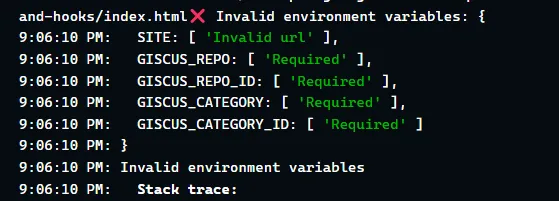
The real-world benefits of this approach became crystal clear when I recently deployed my personal blog to Netlify. A forgotten Giscus configuration in the environment variables immediately triggered an error in the deployment pipeline. This swift feedback saved me valuable time that would have otherwise been spent debugging a live, broken feature. You might encounter similar time-saving advantages by adopting this strategy.
Conclusion
Moving beyond the basic .env file and adopting a schema-based validation approach for environment variables is a significant step towards building more robust, maintainable, and developer-friendly applications. Libraries like Zod provide the tools to bring type safety and clarity to your configuration, ultimately leading to fewer surprises and a smoother development and deployment process. It’s a practice that pays dividends in the long run, especially as your projects grow in scale and complexity.
About the Author